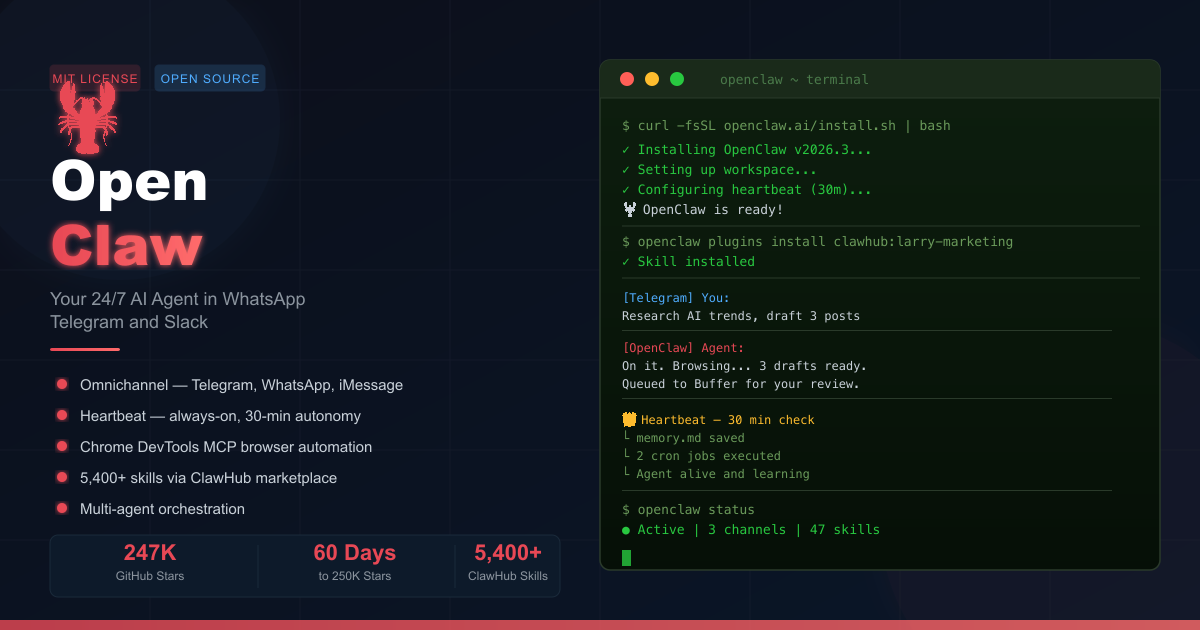
Something fundamental changed in personal computing in early 2026. For the first time, anyone with a laptop and a messaging app can deploy a genuinely autonomous AI agent — one that doesn’t just answer questions, but actually does things: browsing the web, writing files, running code, sending messages, and managing your calendar, all while you sleep.
OpenClaw is the open-source project at the center of this shift. Originally launched by Peter Steinberger as Clawdbot in late 2025 (briefly renamed Moltbot before settling on OpenClaw), it reached 247,000 GitHub stars within 60 days — a milestone that took React over a decade to hit. On February 14, 2026, Steinberger announced he was joining OpenAI and moving the project to an open-source foundation, cementing its community-driven future.
What makes OpenClaw genuinely different from every AI tool that came before it is a deceptively simple idea: your AI agent lives where you already live. Not in a dedicated app you have to remember to open, not in a browser tab — but in Telegram, WhatsApp, Slack, iMessage, or Discord. You text your agent the same way you text a friend. It texts back. And in the background, it’s working on tasks, building memory, and running scheduled jobs — around the clock.
This guide covers everything you need to get started: what OpenClaw is, how to install it (locally or on a Hostinger VPS), which AI model to connect, how to configure messaging apps, what you can automate, and how to stay secure.
What Is OpenClaw and Why Is It Going Viral in 2026?
OpenClaw is not a chatbot. A chatbot answers questions. OpenClaw takes action. It is an open-source, MIT-licensed personal AI agent framework that gives a large language model (LLM) access to your local file system, a web browser, a code executor, and a scheduling engine — then wraps it in a conversational interface delivered through your preferred messaging app.
Answer Capsule: OpenClaw combines an always-on autonomous agent with omnichannel messaging (Telegram, WhatsApp, Slack, iMessage, Discord), local file access, web browsing, and a skill marketplace — making it the first AI tool that genuinely acts as a personal digital employee rather than a reactive assistant.
Three properties that no previous AI tool combined in one package:
- Agency — It can decide what to do next, not just respond to prompts.
- Autonomy — It runs 24/7 in the background without being explicitly triggered.
- Omnichannel — It lives inside apps you already use, not a siloed interface.
OpenClaw vs. Other AI Coding and Agent Tools
| Tool | Lives In | Runs 24/7 | Local File Access | Skill Marketplace | Open Source |
|---|---|---|---|---|---|
| OpenClaw | Telegram / WhatsApp / iMessage | ✅ Heartbeat | ✅ Full read/write | ✅ ClawHub (5,400+) | ✅ MIT |
| ChatGPT | Browser / App | ❌ | ❌ | Limited plugins | ❌ |
| Claude Code | Terminal / IDE | ❌ | ✅ | Via MCP | ❌ |
| GitHub Copilot | IDE | ❌ | Limited | ❌ | ❌ |
| Manus | Browser | ❌ | Limited sandbox | ❌ | ❌ |
What Are OpenClaw’s Core Features?
Answer Capsule: OpenClaw’s five defining features are: omnichannel messaging integration, a 30-minute Heartbeat for always-on autonomy, cron-based task scheduling, Chrome DevTools MCP for authenticated browser automation, and a Markdown-based skill system extensible through ClawHub’s 5,400+ community plugins.
1. Omnichannel Messaging
OpenClaw connects to any combination of: Telegram, WhatsApp, Slack, Discord, iMessage, and Google Chat. You interact with your agent through whichever app you prefer — no new interface to learn.
2. Heartbeat and Cron Jobs
Every 30 minutes, the Heartbeat wakes OpenClaw to:
- Save session summaries to
memory.mdfor long-term context - Run any configured cron jobs (scheduled tasks)
- Perform background maintenance
This makes OpenClaw feel like a living assistant rather than a tool you have to activate. Example cron jobs users configure:
# Morning brief — runs every day at 07:30
Scrape the top 5 AI news stories, summarize them, and send me a digest on Telegram.

# Nightly code review — runs every night at 22:00
Review all commits made today on my main repo and flag any functions without error handling.

# Weekly competitor analysis — runs every Monday at 08:00
Check the pricing pages of [competitor list] for any changes and report differences.
3. Chrome DevTools MCP — Authenticated Browser Automation
OpenClaw can hijack a logged-in Chrome profile on your machine using Chrome DevTools Protocol (CDP). This means it can post to social media, navigate authenticated portals, and fill forms — without ever needing to log in or handle two-factor authentication, because it uses your existing browser session.
4. Skills Library (ClawHub)
Skills are Markdown-based plugins that define new capabilities. Install them via:
# Install a skill from ClawHub
openclaw plugins install clawhub:larry-marketing

# List installed skills
openclaw plugins list
Pre-bundled skills include: 1Password, Apple Notes, Notion, OpenAI Whisper, Nano PDF. ClawHub hosts 80+ curated skills; the community awesome-openclaw-skills registry catalogues over 5,400 contributions.
5. Multi-Agent Orchestration
One OpenClaw instance can spawn and manage sub-agents — specialized workers that handle parallel tasks:
flowchart TD
    User[You via Telegram] --> OC[OpenClaw Main Agent]
    OC --> SA1[Sub-Agent A<br>Web Research]
    OC --> SA2[Sub-Agent B<br>Code Generation]
    OC --> SA3[Sub-Agent C<br>Email Drafting]
    SA1 --> Mem[memory.md<br>Long-term Context]
    SA2 --> Mem
    SA3 --> Mem
    Mem --> OC
    OC --> User
How Do I Install OpenClaw on a Local Machine?
Answer Capsule: Local installation takes under two minutes — paste one terminal command from openclaw.ai, follow the onboarding wizard, and your agent is running. Security experts strongly prefer this approach: your machine’s OS-level protections make backend intrusion significantly harder than a cloud server exposed to the internet.
System Requirements
- macOS, Linux, or Windows (via WSL2)
- Any modern CPU; 16 GB RAM + 512 GB SSD for a comfortable multi-agent setup
- Node.js 18+ (installed automatically by the setup script on most systems)
Step-by-Step Local Installation
Step 1 — Open Terminal (Mac: ⌘ Space → “Terminal”; PC: WSL2 terminal)
Step 2 — Go to openclaw.ai and copy the installation command, then paste it into your terminal:
# The official one-liner (get the latest from openclaw.ai)
curl -fsSL https://openclaw.ai/install.sh | bash
Step 3 — Hit Enter. The installer handles all dependencies. When it finishes, the Onboard wizard launches automatically — answer the prompts to configure your LLM and first messaging channel.
Step 4 — Configure your workspace files (created at ~/.openclaw/workspace/):
| File | Purpose |
|---|---|
agents.md | Defines agent behavior and role |
soul.md | Personality: tone, communication style |
identity.md | Agent name and self-description |
user.md | Information about you, your preferences |
heartbeat.md | Scheduled tasks that run every 30 minutes |
memory.md | Long-term memory (auto-populated) |
How Do I Deploy OpenClaw on a Hostinger VPS?
Answer Capsule: Hostinger’s one-click Docker template deploys a production-ready OpenClaw instance in under five minutes — no SSH or server configuration experience required. The KVM2 plan provides the right balance of CPU, RAM, and headroom for adding automation channels over time.
For users who want 24/7 uptime without a dedicated local machine, a VPS is a practical option. Hostinger offers a pre-configured Docker template that makes the setup straightforward even for beginners.
Security note: A VPS is always-on and internet-facing, which creates a larger attack surface than a local machine. Always set a firewall, store your Gateway Token in a password manager, and avoid pasting sensitive credentials (API keys, database passwords) directly into agent conversations.
Recommended Plan
The KVM2 plan provides sufficient CPU and RAM to run OpenClaw and leaves headroom for future automation tasks and additional messaging channels.
Get started with Hostinger VPS →
Hostinger VPS Deployment Steps
flowchart LR
    Buy[Purchase KVM2 Plan] --> Panel[Open hPanel Dashboard]
    Panel --> Docker[Docker Manager<br>Search openclaw]
    Docker --> Deploy[Click Deploy<br>Enter Gateway Token + API Key]
    Deploy --> Wait[Wait 2 to 5 Minutes<br>Docker Pulls Image]
    Wait --> Firewall[Open TCP Port<br>in Firewall Rules]
    Firewall --> Login[Access IP:Port<br>Login with Gateway Token]
    Login --> Channel[Connect Messaging App<br>WhatsApp QR or Telegram BotFather]
Detailed Steps
Purchase a plan — Log in at hostinger.com and select a VPS plan (KVM2 recommended).
Open Docker Manager — In hPanel, go to your VPS dashboard → Docker Manager → Catalog → search for
openclaw→ click Deploy.Configure credentials:
- Gateway Token: Auto-generated by Hostinger — click the eye icon to reveal it, then save it in a password manager (1Password, Bitwarden, etc.). This is your master password for the dashboard.
- LLM API Key: Paste your Anthropic, OpenAI, or Google Gemini API key.
Click Deploy — Deployment takes 2–5 minutes. Wait for the green “Running” indicator.
Open your firewall — In hPanel → Security → Firewall → edit your active firewall → add a rule:
- Protocol: TCP
- Port: the number shown in Docker Manager (e.g.,
50246) - Source: Anywhere
- Click Add Rule → Synchronize.
Access the dashboard — Click the purple link in Docker Manager (or navigate to
http://YOUR_VPS_IP:PORT), then log in with your Gateway Token.Connect a messaging app — In the dashboard, click Channels:
- WhatsApp: Click Show QR → scan with WhatsApp → Linked Devices
- Telegram: Open Telegram → search for @BotFather →
/newbot→ copy the API token → paste into OpenClaw
Which AI Model Works Best with OpenClaw?
Answer Capsule: Claude Opus 4.6 is the community’s top recommendation for autonomous task completion — it reliably finishes complex multi-step goals without hand-holding. ChatGPT 5.4 via OAuth is popular for intelligence but requires more re-prompting on long agentic tasks. For cost efficiency, the OAuth method lets you reuse a $20/month subscription instead of paying per API call.
Model Comparison
| Model | Strengths | Best For | Cost Method |
|---|---|---|---|
| Claude Opus 4.6 | Best task completion, minimal re-prompting | Complex autonomous workflows | API key or OAuth (risk of ban) |
| ChatGPT 5.4 | Highest intelligence | Single-shot complex reasoning | OAuth ($20/month — officially supported) |
| GPT-4o | Balanced | General-purpose use | API key (pay-per-token) |
| Gemini 1.5 Pro | Long context | Research and summarization | API key |
| Local (Ollama) | Privacy, no API costs | Offline or budget setups | Free |
OAuth Method (recommended for beginners): Instead of paying per API call, link your existing ChatGPT or Claude subscription. OpenAI actively encourages OAuth use with OpenClaw; Anthropic’s stance is less clear, so consider using the API key for Anthropic to avoid account risk.
How Do I Connect Telegram, WhatsApp, and Other Messaging Apps?
Answer Capsule: WhatsApp connects via QR code scan in the OpenClaw dashboard (takes 30 seconds). Telegram requires creating a bot through @BotFather and pasting the resulting API token. Both channels can run simultaneously, letting you message the same agent from different apps.
Telegram Setup
1. Open Telegram → search @BotFather → click Start
2. Send: /newbot
3. Choose a name (e.g., "My Assistant") and a username ending in "bot"
4. Copy the API token from BotFather's confirmation message
5. Paste it into OpenClaw dashboard → Channels → Telegram
WhatsApp Setup
1. OpenClaw dashboard → Channels → WhatsApp → Show QR
2. On your phone: WhatsApp → Settings → Linked Devices → Link a Device
3. Scan the QR code displayed in the dashboard
4. Done — message yourself in WhatsApp to start chatting with your agent
What Can I Automate with OpenClaw Skills?
Answer Capsule: OpenClaw skills turn your agent into a fully operational digital worker — from social media automation and CRM management to daily research briefs, code review, and home automation. The ClawHub marketplace and community registries provide ready-to-install skills for virtually any workflow.
Skills by Category
| Category | Key Skills | What It Does |
|---|---|---|
| Productivity | Notion, Linear, Google Workspace | Task creation, calendar management, doc updates |
| Communication | AgentMail, WhatsApp bulk | Email drafting, mass messaging workflows |
| Browser Automation | Playwright MCP, Chrome DevTools | Web scraping, form filling, authenticated sessions |
| Research & Data | Web Scraper, SEC 13F, Competitor Watch | Daily briefs, financial data, competitor monitoring |
| Marketing | Larry Marketing, TikTok Automation | Content creation, scheduling, analytics loops |
| Development | Code Review, GitHub Integration | Nightly commit review, PR summaries |
| Security | SecureClaw, NemoClaw (NVIDIA) | Enterprise-grade sandboxing and access controls |
| Finance | Google Sheets CRM, Lead Reviver | Dead lead follow-up, pipeline automation |
Real Automation Examples
Social media loop (“Larry Loops”):
Cron: every day at 09:00
Task: Research trending AI topics on X and LinkedIn.
      Write 3 original post drafts in my voice.
      Generate a thumbnail image for each.
      Queue them in Buffer for review.
      Analyze yesterday's post analytics and adjust tone for tomorrow.
CRM dead-lead reviver:
Cron: every Monday at 08:00
Task: Read the "Dead Leads" tab in my Google Sheet.
      For each lead, find their latest LinkedIn activity.
      Draft a personalized follow-up email referencing that activity.
      Send via Gmail and log the send date in the sheet.
What Are the Security Risks and Best Practices?
Answer Capsule: OpenClaw’s power comes from its access to your machine and accounts — making it a high-value target. The three main risks are prompt injection (a malicious website tricks the agent into leaking data), backend intrusion (an attacker accesses the agent’s API), and accidental credential exposure (pasting secrets into conversations). A local installation mitigates the first two significantly.
Local vs. VPS Security Comparison
| Risk | Local Installation | VPS Installation |
|---|---|---|
| Backend intrusion | Low (OS-level sandboxing, local network) | Medium-High (internet-facing server) |
| Prompt injection | Medium | Medium |
| Data privacy | High (all data stays on your disk) | Medium (data on cloud server) |
| Uptime guarantee | Medium (depends on machine being on) | High (always-on) |
| Setup complexity | Low (one terminal command) | Low-Medium (Docker template) |
Security Checklist
- Store your Gateway Token in a password manager — treat it like a root password.
- Never paste production API keys, database connection strings, or user PII into agent conversations.
- Enable the VPS firewall and open only the specific port OpenClaw uses.
- Keep OpenClaw updated — run
openclaw updateregularly for security patches. - Configure memory file permissions — restrict
~/.openclaw/workspace/to your user only. - Use NVIDIA NemoClaw for enterprise deployments requiring strict sandboxing and audit logs.
FAQ
What is OpenClaw?
OpenClaw is an open-source personal AI agent that lives in your messaging apps (Telegram, WhatsApp, Slack, Discord, iMessage) and works autonomously 24/7 — browsing the web, reading and writing files, executing code, and running scheduled tasks without needing an explicit prompt every time.
Is OpenClaw free to use?
OpenClaw itself is free (MIT license). You pay only for the LLM you connect: either via API key (pay-per-token) or the OAuth method, which reuses your existing $20/month ChatGPT or Claude subscription.
Should I install OpenClaw locally or on a Hostinger VPS?
Local is recommended by security experts — Apple’s and Linux’s OS-level sandboxing makes intrusion much harder. A Hostinger VPS is the right choice if you lack a spare machine or need guaranteed 24/7 uptime; just configure the firewall and secure your Gateway Token.
What is the best AI model to use with OpenClaw?
Claude Opus 4.6 for autonomous task completion (reliably finishes complex goals). ChatGPT 5.4 via OAuth for maximum intelligence at low cost.
What is the OpenClaw Heartbeat?
A 30-minute internal timer that keeps the agent active between conversations — saving memory, running cron jobs, and performing background maintenance so the agent stays context-aware across sessions.
How many skills does OpenClaw support?
ClawHub (official marketplace) has 80+ curated skills. The community-maintained awesome-openclaw-skills registry catalogues over 5,400 contributions across productivity, marketing, development, research, and automation categories.
Can I run OpenClaw without technical knowledge?
Yes. One terminal command + onboarding wizard for local installation. One-click Docker template for Hostinger VPS — no prior server experience needed.
Further Reading
- OpenClaw GitHub Repository — Source code, release notes, and community contributions (MIT license)
- ClawHub Skills Marketplace — Official marketplace for OpenClaw skills and plugins
- Hostinger VPS for OpenClaw — One-click Docker deployment, KVM2 plan recommended
- awesome-openclaw-skills — Community-curated registry of 5,400+ OpenClaw skills
- NVIDIA NemoClaw Announcement — Enterprise-grade security wrapper for OpenClaw deployments